Most businesses receive a single number telling them where they rank on Google for a given search term. That number feels concrete - rank three for "emergency dentist" and the world seems fine. But local search results change from block to block, and someone searching from the corner of Jefferson and Main sees a completely different set of businesses than someone five miles away near the community college campus.
A single ranking number hides more than it reveals. It comes from one GPS coordinate, usually near city center, and ignores the geographic reality of how customers actually search. A local rank map fixes this problem by checking rankings at dozens or hundreds of points across a service area, producing a color-coded visual that tells the real story of where a business shows up - and where it disappears.
- 01What Is a Local Rank Map and How Does It Work
- 02Why a Single Ranking Number Lies to You About Local SEO Performance
- 03How to Set Up Your First Local Rank Map the Right Way
- 04Reading a Local Rank Map Like a Pro - Patterns That Reveal Opportunities
- 05Turning Local Rank Map Data into Actions That Move the Needle
- 06How Agencies Use Local Rank Maps to Win and Retain Clients
- 07Common Mistakes That Make Local Rank Map Data Misleading
- 08Final Thoughts
- 09Frequently Asked Questions
What Is a Local Rank Map and How Does It Work
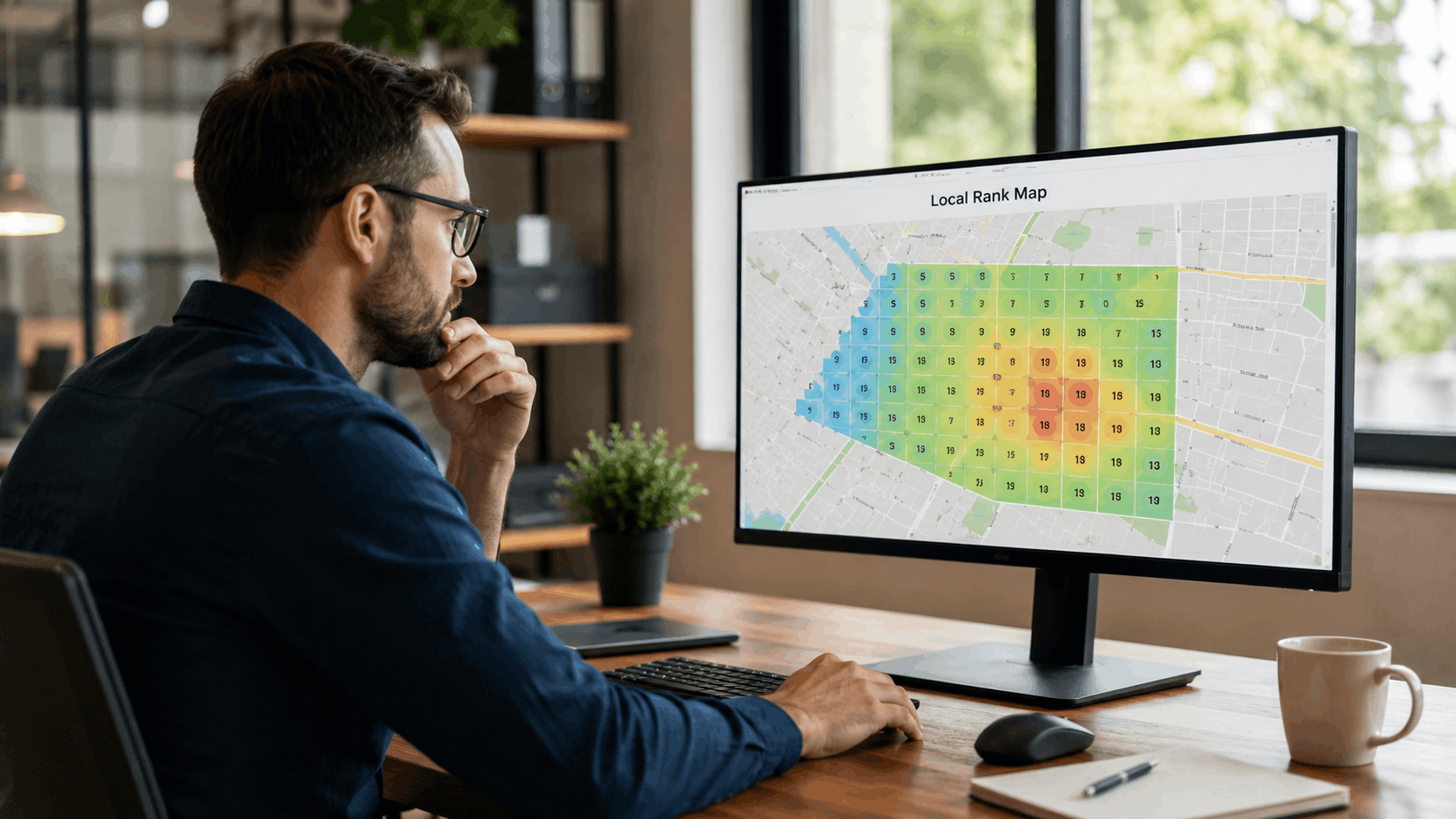
A local rank map is a grid overlay placed on top of a geographic area that checks a business's Google Business Profile ranking at dozens or hundreds of individual points. Each point on the grid represents a simulated search from that exact spot, and the result is a color-coded visual showing where the business ranks well and where it vanishes from local search results.
Think of it like checking cell signal strength in every room of a house instead of just the living room. The living room might show five bars, but the basement gets nothing. A single number from the living room would be misleading. Grid-based rank tracking works the same way - it reveals the full picture instead of one data point.
The table below summarizes the difference between a single ranking number and a local rank map:
| Feature | Single Ranking Number | Local Rank Map (Grid-Based) |
|---|---|---|
| Data points | 1 GPS coordinate | 49 to 169+ grid points |
| Geographic coverage | City centroid only | Full service area |
| Visual output | A number in a spreadsheet | Color-coded heat map |
| Competitor visibility | Not location-specific | Shows competitor strength by zone |
| Actionable insight | Low - no geographic context | High - pinpoints weak areas |
The Grid - How Points Are Placed Across Your Service Area
The grid is typically a 7x7 or 13x13 set of points centered on a business's Google Business Profile pin. A 7x7 grid produces 49 data points. A 13x13 grid produces 169. Each point sits at an equal distance from its neighbors, creating a uniform mesh across the target area.
Grid spacing matters more than most people realize. A tight grid within a 3-mile radius gives fine detail for a neighborhood business. But a roofing contractor serving three counties needs a wider radius - perhaps 15 or 20 miles - with fewer rank tracking grid points to avoid overwhelming the data.
A shop on Maple Avenue may rank differently than one near the highway interchange on Route 9, even if they are in the same city. The local rank map grid size determines whether the tool catches that difference or misses it entirely.
What Each Color and Number on the Map Actually Tells You
Reading a local SEO heat map is straightforward once the color coding clicks. Green spots indicate the business ranks in the top three of Google's local pack - the prime real estate that gets the most clicks and calls. Yellow means the business sits on the edge, typically positions four through seven.
Red means the business is invisible at that location. The searcher at that grid point would not see the business without scrolling or clicking "More places."
Here is a concrete example: a plumber in a mid-size city ranks first near the Riverside district. The entire northwest quadrant of the map glows green. But two miles east near Oakwood Park, the map turns red - position 15. Without the local rank map, the plumber would only see a single number - maybe position 5, averaged from nowhere useful - and miss the fact that an entire neighborhood never finds them.
How a Local Rank Map Differs from Traditional Rank Trackers
Old-school rank tracking follows a simple formula: one keyword, one location, one number. The tool pulls results from a single centroid - usually the geographic center of the city - and reports that as the ranking. For years, this was the only option available.
Grid rank tracking vs traditional SEO tracking comes down to geographic resolution. A local rank map vs rank tracker comparison reveals that the traditional approach treats an entire city as a single point. That works for national SEO where location does not affect results much, but it fails completely for local search.
A bakery owner who sees "Rank 2" from a traditional tracker might feel confident. But if that number came from downtown and 80% of their customers live in the suburbs to the south, the data is misleading. Grid-based tracking captures the variation that traditional tools flatten into a single, often useless number.
Why a Single Ranking Number Lies to You About Local SEO Performance
A single ranking number creates a false sense of confidence or an unnecessary panic. A business might believe it ranks third for "emergency dentist" citywide, but that number was pulled from one GPS coordinate near the courthouse. Two blocks away near the community college campus on Birch Lane, a competitor owns the top spot.
Here are three specific ways a lone number misleads business owners and agency clients:
- It ignores geographic variation entirely. Rankings shift from block to block, but a single number pretends the entire city produces the same result.
- It hides competitive blind spots. A competitor might dominate the zip codes where a business's highest-value customers live, and the single number never reveals it.
- It creates a credibility gap with clients. When a client searches from home and sees different results than the report shows, trust erodes fast.
Inaccurate local SEO data does not just waste time - it leads to bad decisions. A business that thinks it ranks well everywhere stops investing in the areas where it actually needs help most.
Google Serves Different Results for the Same Search a Few Blocks Apart
Google's proximity bias in the local pack algorithm is one of the strongest ranking signals in local search. According to Whitespark's annual Local Search Ranking Factors study, proximity of the searcher to the business is consistently the top factor influencing local pack results.
Imagine two bakeries - one on Jefferson Street and one on Elm Boulevard, three miles apart. A customer standing near Jefferson Street searches "best cupcakes near me" and sees the Jefferson bakery at position one. A customer near Elm Boulevard runs the same search and sees the Elm bakery on top instead.
Both bakeries might claim they "rank number one," and both would be telling the truth - but only for the tiny circle around their own location. Local search results change by location constantly, and any report that ignores this is telling an incomplete story.
Your Competitor Might Own the Zip Codes Where Your Best Customers Live
A competitor with a closer physical address to a high-income neighborhood already has a proximity advantage. Add in stronger local backlinks from the Chamber of Commerce, 50 more reviews mentioning that specific area, and a landing page targeting "dentist near Crestview" - and that competitor can dominate the grid squares where the most valuable customers search.
A single average ranking hides this competitive blind spot entirely. The business owner sees "Rank 4" and assumes things are fine, never realizing that a rival owns the zip codes that generate 60% of local revenue.
Competitor local rank analysis with a grid reveals exactly where a rival outperforms and by how much. That information changes the conversation from "are we ranking?" to "where do we need to fight harder?"
Reporting a Single Number to Clients Erodes Trust Over Time
This one hits agencies hard. An SEO professional tells a client "you rank number 4 for 'roof repair.'" The client goes home to their house on Sycamore Drive, searches on their phone, and sees themselves at position 12. The next call is uncomfortable.
The agency was not lying - the rank tracker pulled from city center, and the client lives six miles away. But the damage to rank tracking credibility for agencies is real. The client now questions every number in the report.
Grid-based local SEO client reporting solves this. A visual map lets the client see that they rank well downtown but drop off near their own neighborhood. Now both sides are looking at the same reality, and the conversation shifts to fixing the weak spots instead of arguing about whether the data is accurate.
How to Set Up Your First Local Rank Map the Right Way
Setting up a local rank map takes about ten minutes, but the configuration choices matter. The wrong center point, radius, or keyword list will produce a map that looks impressive but teaches nothing useful.
Start by centering the grid on the business's actual GBP pin location - not city hall, not the geographic center of the metro area. The GBP pin is where Google calculates proximity from, so it should anchor the grid.
Next, select a radius that matches the business's realistic customer draw area. A neighborhood pizza shop on Oak Street does not need to track rankings 20 miles away. A plumbing company covering the greater metro area does. This local rank map setup guide walks through each decision point so the first scan produces actionable data.
Choosing the Right Grid Center, Radius, and Density
Grid configuration breaks down into three decisions. First, the center point - always the GBP pin. Second, the radius. A tight 3-mile radius with a 13x13 grid works for a neighborhood salon on Pine Street where most customers live within a 10-minute drive. A roofing contractor covering three counties needs a 15-mile radius, possibly with a 7x7 grid to conserve scan credits.
Third, grid density for local SEO depends on how granular the business needs the data. More points reveal more geographic detail but cost more per scan.
One common mistake: making the local rank map radius too wide. When every point on the map shows red, the data creates noise instead of insight. Match the grid to where customers actually come from, not where the business wishes they came from.
Picking the Keywords That Actually Drive Phone Calls and Foot Traffic
Not every keyword deserves a grid scan. Focus on the 5 to 10 terms that match what customers actually type when they are ready to buy. "AC repair near me" matters more than "HVAC services" if the phone rings from the first one. High-intent local keywords for rank maps are the ones tied to action - calls, directions, form fills.
Content gap analysis tools can surface terms a business is missing. If a competitor ranks for "same day water heater replacement" and the business does not even have that phrase on their site, that is a gap worth closing.
Local SEO keyword selection should reflect the language customers use, not industry jargon. A homeowner does not search "residential plumbing remediation" - they search "fix leaking pipe fast."
Running Scans on a Schedule Without Burning Through Credits
Scan frequency depends on how competitive the market is. Weekly scans work for industries like personal injury law or emergency services where rankings shift fast. Bi-weekly scans suit more stable markets like accounting firms or veterinary clinics.
Running a 13x13 grid daily for 20 keywords burns through API credits fast and is almost never necessary. A better approach: run a baseline scan, implement changes - new content, review requests, backlink outreach - then re-scan two weeks later to measure impact.
This grid rank tracking schedule protects the budget while still capturing meaningful movement. Save the frequent scans for the 2 to 3 keywords that generate the most revenue.
See where you rank - block by block.
Vouch Local maps your local rankings across every neighborhood and shows you exactly who wins each area. Start free, no credit card required.
Reading a Local Rank Map Like a Pro - Patterns That Reveal Opportunities
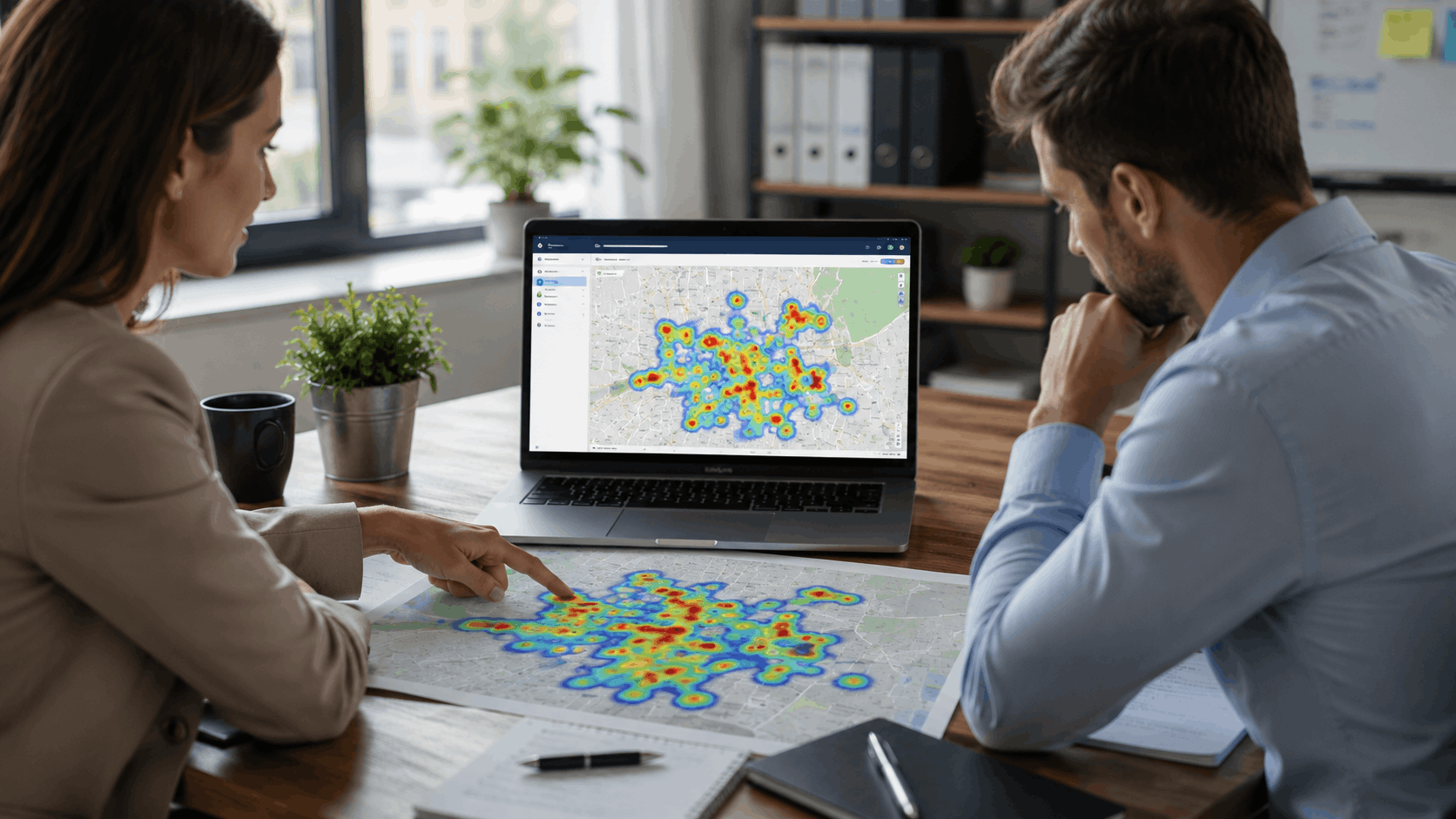
Most people glance at the colors on a local rank map and stop there. Green feels good, red feels bad. But the real value comes from spotting patterns in the data - clusters, corridors, and gaps that point to specific actions.
The table below shows three common patterns, what causes them, and what to do about each one:
| Pattern | What It Looks Like | Likely Cause | Recommended Action |
|---|---|---|---|
| Donut | Green near GBP pin, red at edges | Over-reliance on proximity signal | Build reviews, backlinks, and content targeting outer areas |
| Competitor Shadow | Block of red near a rival's address | Competitor has stronger local signals in that zone | Analyze competitor reviews, links, and landing pages |
| Directional Drift | Strong rankings skew one direction | Citations and reviews reference one neighborhood disproportionately | Create content and earn links from underperforming direction |
Each of these local rank map opportunities maps directly to a tactic. The grid is not just a report - it is a roadmap.
The Donut Pattern - Strong Near You but Weak at the Edges
The donut pattern is the most common shape on a local rank map. Rankings glow green in a tight ring around the GBP pin - maybe within half a mile - but drop off sharply a mile or two out. The outer ring turns yellow and then red.
This usually means the business relies too heavily on proximity and lacks the review volume, backlinks, or content to compete beyond its immediate block. Google gives a proximity boost, but that boost has limits. When competitors on the edge of the service area have stronger signals, they take over.
Fixing the donut means building geographic relevance outward. Reviews that mention distant neighborhoods, landing pages targeting those areas, and backlinks from organizations in the outer ring all help push the green further from the center.
The Competitor Shadow - A Block of Red Near a Rival's Location
A patch of poor rankings on the grid often lines up perfectly with a competitor's physical address. This competitor shadow local rank map pattern makes sense - that rival gets their own proximity boost in their neighborhood, and if they also have strong reviews and local backlinks, they dominate that zone.
The fix starts with identifying which competitor owns that shadow. Pull up their GBP listing and look at what they are doing differently. Do they have 200 reviews to the business's 45? Do reviews mention that specific neighborhood by name? Do they have a landing page targeting "electrician near Westfield Commons"?
Competitor local SEO domination zones are hard to crack, but not impossible. Matching their review count, earning links from nearby organizations, and publishing content that references local landmarks in that area can chip away at the shadow over time.
The Directional Drift - Rankings That Favor One Side of Town
Sometimes a local rank map shows strong rankings to the north of the business pin but weak rankings to the south - or east versus west. This directional ranking drift in local SEO happens for several reasons.
Most commonly, the business's citations and reviews disproportionately reference one part of town. If 80% of reviews mention the Harbor district and zero mention the Lakewood area to the south, Google associates the business more strongly with Harbor.
City boundary lines also cause uneven local rank distribution. If the business address sits at the edge of one city's boundary, Google may not associate it with the neighboring city at all. Content and citations that reference both areas can help correct the drift.

Turning Local Rank Map Data into Actions That Move the Needle
Data without action is just a pretty picture on a screen. The real value of a local rank map shows up when grid-based insights connect to specific local SEO tactics. Each red zone on the map points to something a business can do - build content, earn links, or generate reviews that carry geographic weight.
The goal is simple: turn red squares green, one zone at a time. Prioritize the zones where the most valuable customers search, and work outward from there.
Building Neighborhood-Specific Content to Fill Red Zones on the Map
A dentist who ranks poorly near the Crestview neighborhood could publish a page titled "Family Dentist Near Crestview" that references Crestview Elementary School, the intersection of Ridge Road and Park Avenue, and the walking trail behind the library. These geographic references send strong local signals to Google.
Neighborhood landing pages for local SEO should read like they were written by someone who knows the area - because they should be. Generic content stuffed with a neighborhood name fools no one.
Content gap discovery tools surface the exact terms competitors rank for in those weak zones. If a rival ranks for "teeth whitening near Crestview" and the business has no page targeting that phrase, the gap is clear and the fix is concrete.
Earning Local Backlinks That Strengthen Weak Grid Squares
Backlinks from geographically relevant sources improve rankings in specific grid zones. A sponsorship link from the Westfield Little League website or a feature in the Lakewood community newsletter sends a geographic signal to Google that the business is connected to those areas.
Competitor link analysis reveals which local sites already link to rivals. If a competitor has links from three neighborhood associations and the local Rotary Club, those become outreach targets. Local backlinks for rank improvement work best when they come from sources within or near the weak grid squares.
This is not about buying links or mass outreach. It is about genuine community involvement that produces real references from real local organizations.
Encouraging Reviews That Mention Specific Areas and Services
Reviews that say "great plumber in the Harbor district" carry geographic weight that a generic five-star review does not. Google's algorithm picks up on location mentions in review text and uses them as relevance signals.
The approach here is subtle. A business cannot script reviews - that violates Google's review policies and risks penalties. But a follow-up message that says "We'd love to hear about your experience - what service did we perform and where are you located?" naturally prompts customers to include geographic details.
Responding to reviews with location-specific language helps too. A reply that says "Thanks for trusting us with your kitchen remodel near Brookside Park" reinforces the geographic connection without asking the reviewer to change anything.
See where you rank - block by block.
Vouch Local maps your local rankings across every neighborhood and shows you exactly who wins each area. Start free, no credit card required.
How Agencies Use Local Rank Maps to Win and Retain Clients
For agencies managing multiple client locations, grid-based rank maps change the reporting conversation entirely. Instead of arguing about whether a client ranks third or fifth, the agency shows a visual map that tells the full geographic story. The conversation moves from "is this number right?" to "where do we focus next?"
Agency-specific use cases for local rank maps include:
- Onboarding audits that show a new client exactly where they stand across their entire service area on day one
- Monthly reporting with before-and-after maps that show red squares turning green over time
- ROI proof that ties ranking improvements in specific zones to increases in calls or foot traffic from those areas
- Competitive pitches that compare a prospect's map against their top competitor's map side by side
- Retention conversations that give clients a visual reason to continue investing in local SEO
Using a Rank Map as a Sales Tool During Prospect Audits
Running a free local rank map for a prospect during a sales call creates an immediate reaction. The prospect sees exactly where they are invisible - entire neighborhoods where potential customers never find them. That visual is far more persuasive than a slide deck full of buzzwords.
The strongest move is comparing the prospect's map against their top competitor's map. When a prospect sees green where their rival shows red, and red where their rival shows green, the competitive dynamic becomes obvious and urgent.
A local SEO audit for prospects built around grid data turns a vague "you need SEO" pitch into a specific "you are missing customers in these three zip codes" conversation.
Monthly Reporting That Clients Actually Understand and Value
Spreadsheets full of ranking numbers put most small business owners to sleep. A local rank map tells the story in seconds. A client who sees red squares from January turning green by March has a visceral sense of progress that no table of numbers can match.
Visual local SEO reporting builds trust because the client can verify it. They can search from their home, from their friend's office across town, and from the parking lot of the local grocery store - and the results should match what the map shows for those locations.
Include the before-and-after maps at the top of every monthly report. Save the detailed metrics for the appendix.
Scaling Grid Tracking Across Dozens of Client Locations
Managing scan budgets across 30 or 50 client locations requires discipline. Not every client needs a 13x13 grid scanned weekly. Tier clients by competitiveness and scan frequency accordingly - weekly for the personal injury attorney, bi-weekly for the family dentist, monthly for the specialty boutique.
Set up alerts that fire when a client's map shifts dramatically - like a cluster of green squares suddenly turning red. That early warning system lets the agency investigate before the client notices and calls in a panic.
Platforms like Vouch Local allow agencies to run grid-based tracking alongside competitor link analysis and content gap discovery from a single dashboard, which eliminates the need to stitch together three or four separate tools for multi-location grid rank tracking. Details are available at vouchlocal.ai.

Common Mistakes That Make Local Rank Map Data Misleading
Even a local rank map can mislead if the setup is wrong or the data is misread. The tool is only as good as the configuration behind it. Three mistakes show up repeatedly among businesses and agencies that are new to grid rank tracking.
Setting the Radius Too Wide and Drowning in Irrelevant Data
A pizza shop on Cedar Lane does not need to track rankings 25 miles away. When the local rank map radius is too wide, the map fills with red that means nothing because those searchers would never drive that far for a pizza.
Match the grid radius to the business's realistic customer draw area. For a restaurant, that might be 3 to 5 miles. For a medical specialist, 15 to 20 miles. The grid tracking radius best practice is simple: if a customer at that grid point would not realistically visit the business, do not waste a scan credit on that point.
A map full of red is not useful - it is demoralizing and provides no direction for improvement.
Panicking Over Normal Day-to-Day Ranking Fluctuations
Local rankings shift by a position or two regularly. Google's algorithm updates, changes in review velocity, and even time of day can cause minor movement. Running a scan Monday and again Tuesday and seeing a few squares change color is normal.
The mistake is reacting to every small change. A business owner who sees a square go from green to yellow on a Tuesday and immediately rewrites their GBP description is chasing noise, not signal.
Look at trends over weeks, not daily snapshots. Local ranking fluctuations are normal and expected. The question is whether the overall map is getting greener over time, not whether one square flickered this morning.
Confusing Local Pack Rankings with Organic Rankings on the Grid
Most local rank maps track the Google local pack - the map and three listings that appear at the top of local search results. They do not track the organic blue links below the pack.
A business might rank well in organic results but be invisible in the local pack, or vice versa. Knowing which result type the grid measures prevents misinterpretation. If the grid says "position 8" and the business owner searches and sees themselves in the second organic spot, they might think the map is wrong - but the map was tracking the local pack, not organic.
Always confirm whether the tool reports local pack vs organic rankings before drawing conclusions from the data.
See where you rank - block by block.
Vouch Local maps your local rankings across every neighborhood and shows you exactly who wins each area. Start free, no credit card required.
Final Thoughts
A single ranking number is a comfortable fiction. It gives a business one thing to look at and one way to feel about local SEO performance. But local search does not work in single numbers - it works in geography, proximity, and block-by-block competition.
A local rank map replaces that fiction with a detailed, honest picture of where a business shows up and where it does not. Every red square is a neighborhood full of potential customers who cannot find the business. Every green square is proof that something is working.
The businesses and agencies that treat the map as a working document - running scans, spotting patterns, and taking action on weak zones - are the ones that consistently grow their local visibility. The ones staring at a single number are flying blind and calling it strategy.
Frequently Asked Questions
What exactly is a local rank map?
A local rank map is a visual grid overlaid on a geographic area that shows where a business ranks in Google's local pack at each grid point. It replaces a single ranking number with a full picture of visibility across a service area, using color coding to show strong, moderate, and weak positions.
How often should I run a local rank map scan?
For most businesses, weekly or bi-weekly scans strike the right balance between staying informed and avoiding overreaction to normal fluctuations. Highly competitive industries like personal injury law or emergency services may benefit from more frequent checks.
Can a local rank map help me find out why a competitor outranks me?
Yes. By comparing your grid against a competitor's, you can pinpoint the exact zones where they dominate. From there, you can investigate their reviews, backlinks, and content to figure out what gives them an edge in those specific areas.
What grid size should I choose for my local rank map?
A 7x7 grid works well for businesses with a small draw area like restaurants or salons. A 13x13 grid provides more detail for service-area businesses like HVAC companies or roofers covering a wider territory. Larger grids use more scan credits but give finer geographic resolution.
Is a local rank map worth it for a business with only one location?
Single-location businesses often benefit the most because they rely entirely on one GBP listing to attract nearby customers. A local rank map shows exactly how far that listing's visibility extends and where targeted effort like neighborhood-specific content or local backlinks can push it further.
How does Vouch Local's grid-based rank tracking compare to other tools?
Vouch Local combines grid-based rank tracking with competitor link analysis, content gap discovery, and automated local outreach in a single platform built for small businesses and agencies. Instead of stitching together three or four separate tools, users get the full local SEO picture from one place at vouchlocal.ai.